Shopify Payments Order-to-Cash Reporting
This feature is currently in beta and may change over time.
Overview
Bookkeep now provides a Shopify Payments Order-to-Cash reporting view that gives full visibility into how individual transactions move from order creation to payout.
This report helps merchants and accountants understand:
-
Which orders are included in the Shopify Payments balance
-
Whether a specific transaction has been paid out to the bank
-
The fees and adjustments associated with each order
-
Any outstanding balances tied to a transaction
The report is available at the Shopify domain level and provides transaction-level insight for reconciliation and analysis.
Where to Find the Report
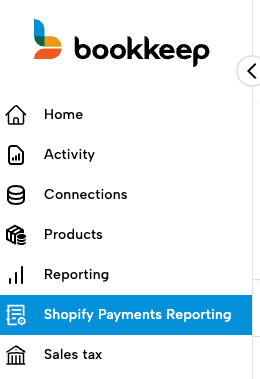
The Shopify Payments reporting view can be found in the left navigation menu within Bookkeep.
Location:
Left Navigation → Shopify Payments Reporting
This feature is only available on Advanced Unlimited plans.
How the Report Works
When you select a date range, Bookkeep displays all transactions that impact the Shopify Payments balance during that period.
Transactions included in this view may originate from:
-
Shopify Payments
-
Shop Cash
-
Shopify Pay Installments
-
Flow Commerce transactions processed through Shopify
This report does not include transactions that do not flow through the Shopify balance, such as PayPal payments, Authorize.net transactions, cash, and similar payment methods.
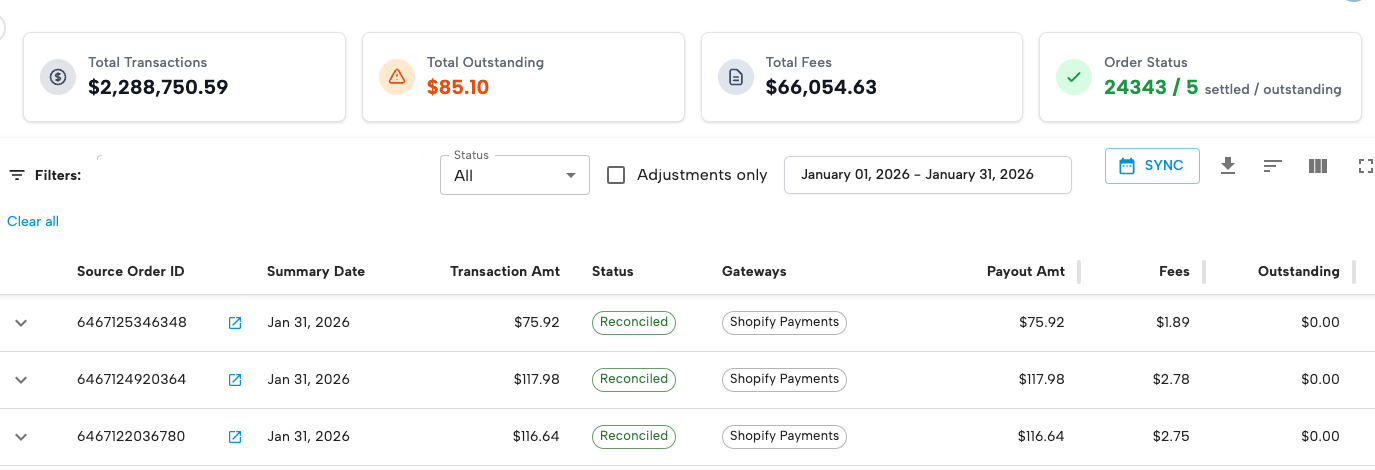
Each row represents an order with associated transactions on a specific date, allowing you to review how funds move through the Shopify Payments system.
Key Data Included in the Report
The report includes several important fields to help with reconciliation and financial analysis.
Transaction Amount
Displays the gross transaction value associated with the order for a specific date.
Outstanding
Shows whether a transaction has been fully paid out to your bank account.
If a balance remains, the transaction may:
-
Still be pending payout
-
Be awaiting processing
Fees
The report displays the processing fees associated with the specific transaction(s).
This helps provide visibility into the net amount that will ultimately be paid out.
Adjustments
Adjustments tied to an order are also displayed.
Examples may include:
-
Sales tax withheld
-
Shipping charges
-
Other Shopify adjustments
These adjustments impact the final payout amount.
Exporting and Customizing the Report
The Shopify Payments reporting view includes several tools for deeper analysis.

Using the icons shown above, users can:
-
Export the raw transaction data for use in Google Sheets or Excel
-
Sort by column to analyze transactions in different ways
-
Hide or show columns depending on the information needed
This flexibility makes it easier to investigate reconciliation questions.
Investigating Discrepancies
If you notice a discrepancy in the report, the recommended next step is to review the specific order directly in Shopify.
In some cases:
-
The order may not yet have been paid out
-
The transaction may have an outstanding balance
-
Shopify may still be processing the payout
If an outstanding balance appears and the payout timing is unclear, the question should be directed to Shopify.
Bookkeep does not control or influence when transactions are paid out through Shopify Payments.
Why This Report Is Helpful
The Shopify Payments Order-to-Cash report provides several benefits:
-
Transaction-level visibility into the Shopify Payments balance
-
Clear insight into fees and adjustments
-
Improved ability to trace orders to payouts
-
Better support for reconciliation and financial analysis
This report helps merchants and accountants more easily understand how orders progress from sale to payout within Shopify Payments.