Shopify: Deferred Revenue and Fulfillment Based Revenue Recognition
Bookkeep's Shopify integration provides seamless connectivity between your Shopify store and accounting platform. This integration includes an Ecommerce journal entry feature that automatically records daily sales data from the previous day into your accounting system. This ensures that your financial records are always up-to-date and accurate, without the need for manual data entry.
For more complex entities, recording sales prior to fulfillment does not meet their revenue recognition requirements. To address this, Bookkeep developed the Shopify Fulfillment Revenue Recognition Journal Entry. This entry supports entities that recognize revenue upon fulfillment, since the standard Ecommerce journal entry does not account for whether an item has been fulfilled.
Additionally, Bookkeep now automates the recognition of fulfilled refunds and canceled fulfillments—both critical for accurately understanding true revenue. This feature reviews all returns and incorporates fulfilled returns into the Fulfillment Revenue Recognition journal entry. Fulfilled returns appear as a separate line within the entry for clear visibility. Canceled fulfillments also appear on their own line, representing sales that were previously recognized but later reversed, requiring a reduction of sales and a return of the amount to deferred revenue.
Below, we will explain how this process of financial data flow operates. You will need the Ecommerce entry and Fulfillment Revenue Recognition entry working in parallel to capture the deferred revenue first and the revenue once fulfilled.
The Ecommerce Journal Entry
This entry captures all sales (regardless of fulfillment status), discounts, refunds, and categorizes payments based on tender type. It also accounts for pending payments, which may result in accounts receivable. This entry is built to tie out to the Finances Summary in Shopify — a few lines are expected to differ, and Matching Your Shopify Sales Summary to Shopify's Finances Summary explains each one. Below is an example mapping:
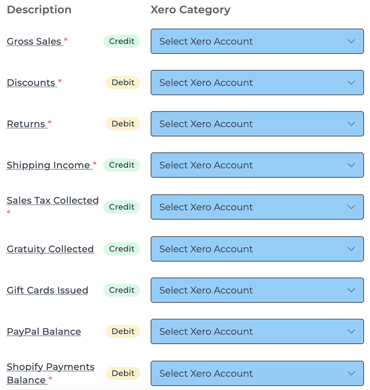
For entities recognizing revenue upon fulfillment, the Gross Sales, Discounts, Returns, Gift Cards Issued, and Shipping Income lines in this journal entry should be mapped to a deferred revenue account. This is necessary because the Ecommerce journal entry works in tandem with the Fulfillment Revenue Recognition entry (described below) to ensure revenue is tracked accurately.
The Fulfillment Revenue Recognition Journal Entry
This entry captures fulfilled orders, moving gross sales, discounts, gift cards issued, and shipping income from deferred revenue to their respective accounts once an order is completely fulfilled.
For items that do not require fulfillment, they are recognized once the order status is marked as “fulfilled.”
This journal entry records all fulfilled returns for a given date but includes only fully fulfilled orders. Returns from unfulfilled or partially fulfilled orders are excluded until the entire order reaches a fulfilled status.
Below is an example mapping:
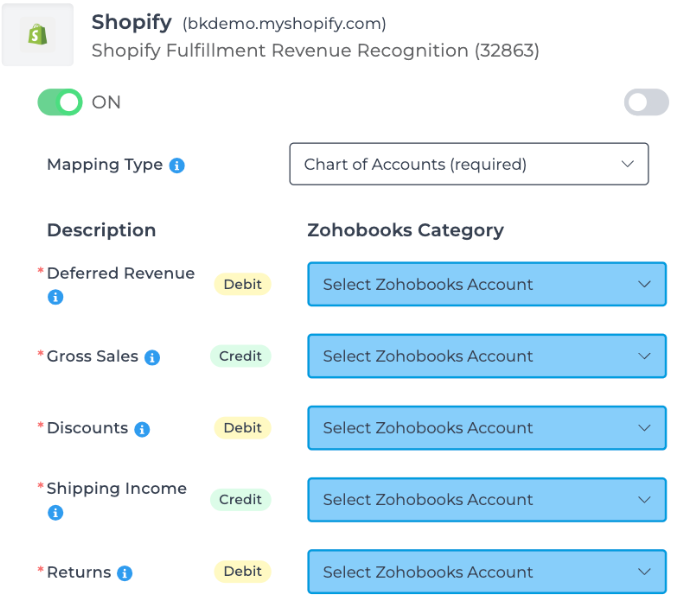
Ensure the deferred revenue account used in the Fulfillment Revenue Recognition entry is also used in the Ecommerce entry for consistency.
This fulfillment-based revenue journal entry also captures canceled fulfillments associated with orders that were previously marked as fully fulfilled. When a fulfillment is canceled, the related line items and discounts appear under the Canceled Fulfillments line. This entry reduces sales and moves the canceled amounts back into deferred revenue until the items are re-fulfilled.
Gift Card Handling Across Templates
When a gift card is attached to an order, it’s captured on the Gift Cards Issued line within the eCommerce Sales Summary journal entry. If you’re also using the Fulfillment Revenue Recognition journal entry, the same gift card will be captured again when the order is fulfilled—just like any other line item.
This setup allows you to map the Gift Cards Issued line on the eCommerce journal entry to Deferred Revenue, since the liability is recognized upon fulfillment, when the gift card is actually delivered to the customer.
For items that do not require fulfillment, they are recognized as revenue once the order status is marked as “fulfilled.”
Example Net Effect of the Ecommerce and Fulfillment Revenue Recognition Journal Entries
Below is an example showing the net effect of both journal entries on a specific day, demonstrating the workflow’s value:
Example
Suppose you receive $150** in cash returns: **$100 for items not yet fulfilled and $50 for items already fulfilled.
The desired net journal entry would be:
-
RETURNS: Debit $50
-
DEFERRED REVENUE: Debit $100
-
CASH BALANCE: Credit $150
In this scenario, Deferred Revenue is debited by $100 for the unfulfilled items, since they are not yet recognized as gross sales.
How Bookkeep Achieves This with Two Entries
-
eCommerce Journal Entry:
-
RETURNS: Debit $150 — mapped to the deferred revenue account, capturing all returns (fulfilled and unfulfilled).
-
CASH BALANCE: Credit $150
-
-
Fulfillment Revenue Recognition Journal Entry:
-
RETURNS: Debit $50
-
DEFERRED REVENUE: Credit $50 — mapped to the deferred revenue account, capturing only fulfilled returns.
-
The two lines mapped to Deferred Revenue above create a net debit of $100, which matches the intended net entry in the example above.
If you have any questions, contact support@bookkeep.com.