How to Create Franchise Fee Settings for Payout Groups
For franchisors using Bookkeep's multi-bank settlement, franchise fees are calculated automatically every day as a percentage of each location's net sales and deducted from the location's payout balance. Fee settings are configured per payout group — a franchisee's set of locations and their destination bank account — as a fee schedule with an effective start date, so you always know exactly which rate applied on any given sales day.
Fee schedules are currently set up for you by the Bookkeep team — contact support with the details below. A self-service interface is coming.
What you'll need for each payout group
To create franchise fee settings for a payout group, provide:
- The payout group — which franchisee / location group the fee applies to. Each payout group has its own independent fee settings, so different franchisees can have different rates.
- The fee rate — a percentage of daily net sales, for example 5%.
- A label for the fee — for example Royalty Fee or Brand Fund Fee. This label appears on every journal line, payout email, and report, so franchisees see exactly what they were charged.
- The effective start date — the first sales day the fee applies to. No fees are charged for sales days before this date.
- Tax rates, for Canadian locations — up to two tax rates with their own labels (see below). US locations don't need any.
Fees are then calculated per location, per day: net sales × fee rate, with any taxes added on top of the fee amount. The total is deducted from the location's payout balance and credited to the franchisor.
When the fee is deducted from the payout
A franchise fee is calculated the morning after each sales day, but Shopify usually deposits that day's Shopify Payments a few business days later. By default the fee is deducted from the next payment sent to the location, whether or not the matching Shopify deposit has arrived yet.
Franchisors can instead ask Bookkeep to hold each day's fee until that day is fully funded. With this setting on, the fee for a sales day is only added to a location's payment once Shopify has deposited the full Shopify Payments amount for that location and sales day. A day that Shopify splits across two deposits keeps its fee on hold until the second deposit lands, so a fee is never taken out of a payment that does not yet contain the sales it was calculated on.
The check compares two figures for each location and sales day:
- Shopify Payments — what customers paid through Shopify Payments that day, net of refunds and before Shopify's processing fees.
- Received from Shopify — the portion of that amount Shopify has deposited into the franchisor's source bank account so far.
When Received from Shopify reaches the Shopify Payments total, the day is fully funded and its fee is released into the next payment. If a day never fully reconciles (for example a dispute or a Shopify adjustment that changes the deposit), the fee is released automatically after a hold window of 14 days from the sales day, so no fee is ever lost. The hold window can be adjusted per franchisor by Bookkeep support.
Both figures appear in the Sales By Day table of each location's payout report, alongside Received by Location, the gross Shopify Payments for the day that have already been paid out to the location:
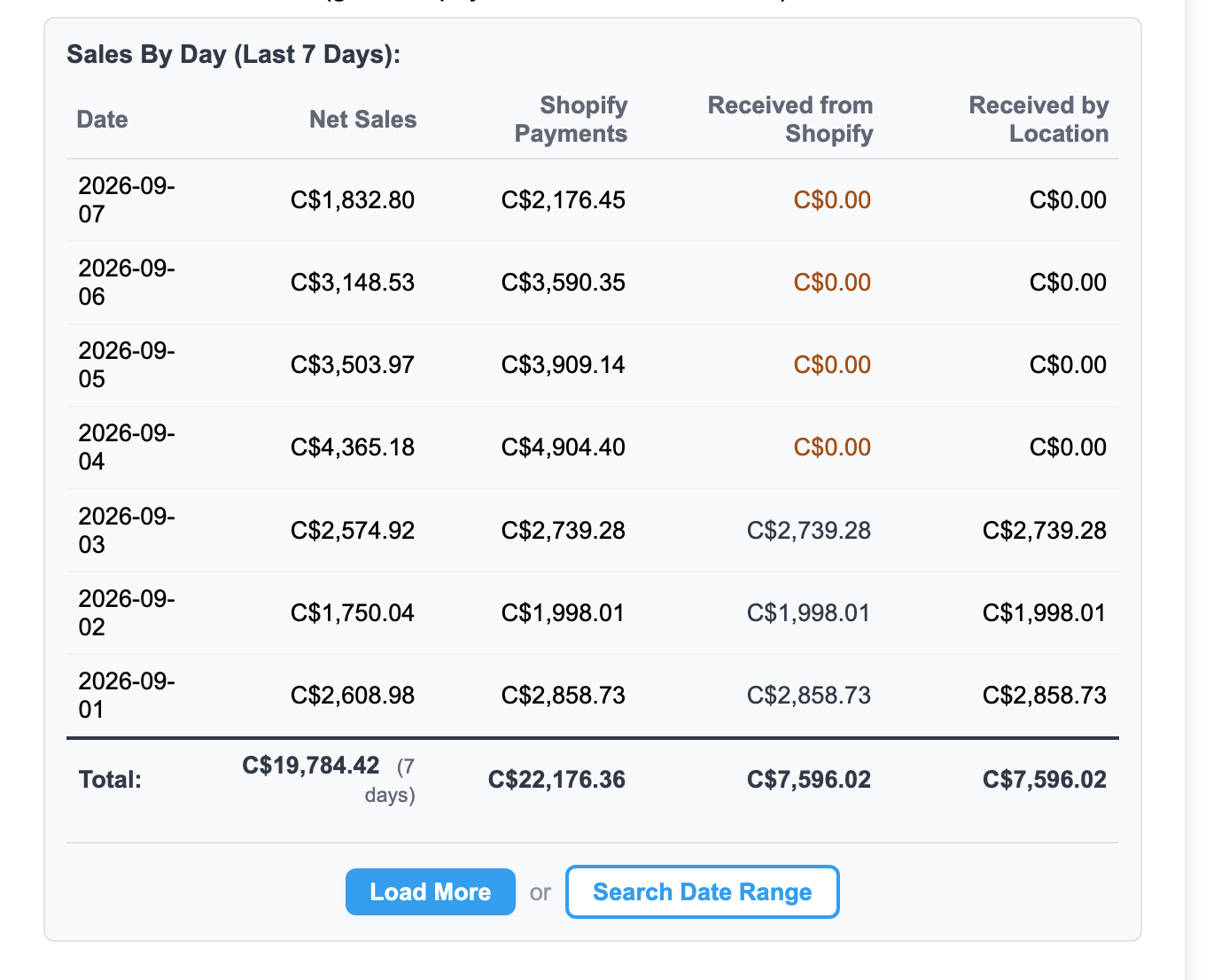
In this example, September 1 to 3 are fully funded and paid out, so all three amount columns match. September 4 to 7 show Received from Shopify in amber at C$0.00 because Shopify has not deposited those days yet; with the hold enabled, the fees for those four days wait until each day's deposit arrives. Hover over any column header in the report for a description of what it contains.
This setting is off by default. Contact Bookkeep support to turn it on for your franchise or to change the hold window.
Setting up taxes on the fee
Canada — two tax rates
In Canada, franchise fees are generally subject to sales tax. Each fee schedule supports two independent tax rates, each with its own label:
- GST or HST — for example GST 5%
- A provincial tax where applicable — for example QST 9.975% in Quebec
Both taxes are calculated on the fee amount (not on net sales), itemized separately on the franchisee's statement with their labels and rates, and included in the amount collected from the location's payout. For example, a Quebec location with $1,000 in net sales and a 5% royalty would be charged $50.00 royalty + $2.50 GST + $4.99 QST.
USA — no taxes needed
For US locations, the settings are simply the fee rate and its label. Only the fee amount is deducted from the location's payout.
Changing a rate: schedule it ahead of time
Because every rate has an effective start date, a rate change can be set up before it takes effect. If your franchise agreement changes the royalty from 5% to 6% starting on the first of next month, the new setting is entered today with a start date of the 1st:
- Sales days through the end of this month are charged at 5%.
- Sales days from the 1st onward are charged at 6%.
- The changeover happens automatically at month end — nothing to remember on the day.
The previous rate is preserved with its exact date range. If a past sales day ever needs to be reprocessed, it is always charged at the rate that was in effect on that day, not today's rate — and a day that has already been charged is never charged twice.
What franchisees see
Franchise fees and their taxes are fully itemized everywhere a franchisee looks:
- The payout email sent for every payment lists the fee and each tax with its label, rate, and the sales day it applies to.
- The payout portal export details every franchise fee line alongside BOPIS, gift card, and Shopify payout activity.
- Each fee line's description shows the label, the net sales it was calculated on, the rate, and the date — for example: Royalty Fee on 1000.00 (5%) 2026-08-01.
- The Sales By Day table in the payout report shows, for every sales day, the Shopify Payments total, how much of it Shopify has deposited so far, and how much has been paid out to the location, so a franchisee can see why a fee for a recent day has not been deducted yet.
Frequently asked questions
Can different franchisees have different rates?
Yes. Fee settings are per payout group, so each franchisee (or group of locations) can have its own rate, label, and taxes.
What happens on days before a franchisee's fee start date?
Nothing is charged. Fees are only collected for sales days covered by an active fee schedule, so a new franchisee's fees begin exactly on the agreed start date.
Can a rate be changed retroactively?
Rates apply from their effective date forward. If a historical correction is needed, contact support — corrections are made as clearly-labeled manual adjustments rather than by rewriting history, so your records always reconcile.
Why hasn't the fee for a recent sales day been deducted yet?
If your franchisor holds fees until each day is fully funded, the fee for a sales day is only deducted once Shopify has deposited the full Shopify Payments amount for that day. Check the Sales By Day table in your payout report: while Received from Shopify is below Shopify Payments (shown in amber), the fee for that day is on hold. It is deducted from the first payment after the day is fully funded, or after the franchisor's hold window (14 days by default) if the day never reconciles.
How do I request a change?
Contact Bookkeep support with the payout group, the new rate (and tax rates if Canadian), the label, and the date it should take effect. Every change is recorded with who requested it and when.