TikTok Shop Journal Entries
Bookkeep builds two journal entries from the TikTok Shop income export:
- TikTok Shop Summary, one per day of delivered sales.
- TikTok Shop Deposit, one per payout TikTok sends to your bank.
Both are built from the Order details, Statements and Payments tabs of the export, as described in How to Set Up TikTok Shop with Bookkeep.
TikTok Shop Summary
TikTok pays you when an order is delivered, so the summary is organized by delivery date: every delivered sale lands on the day it was delivered. Refunds, cancellations and settlement adjustments have no delivery date of their own, so they land on the date of the TikTok statement that settled them.
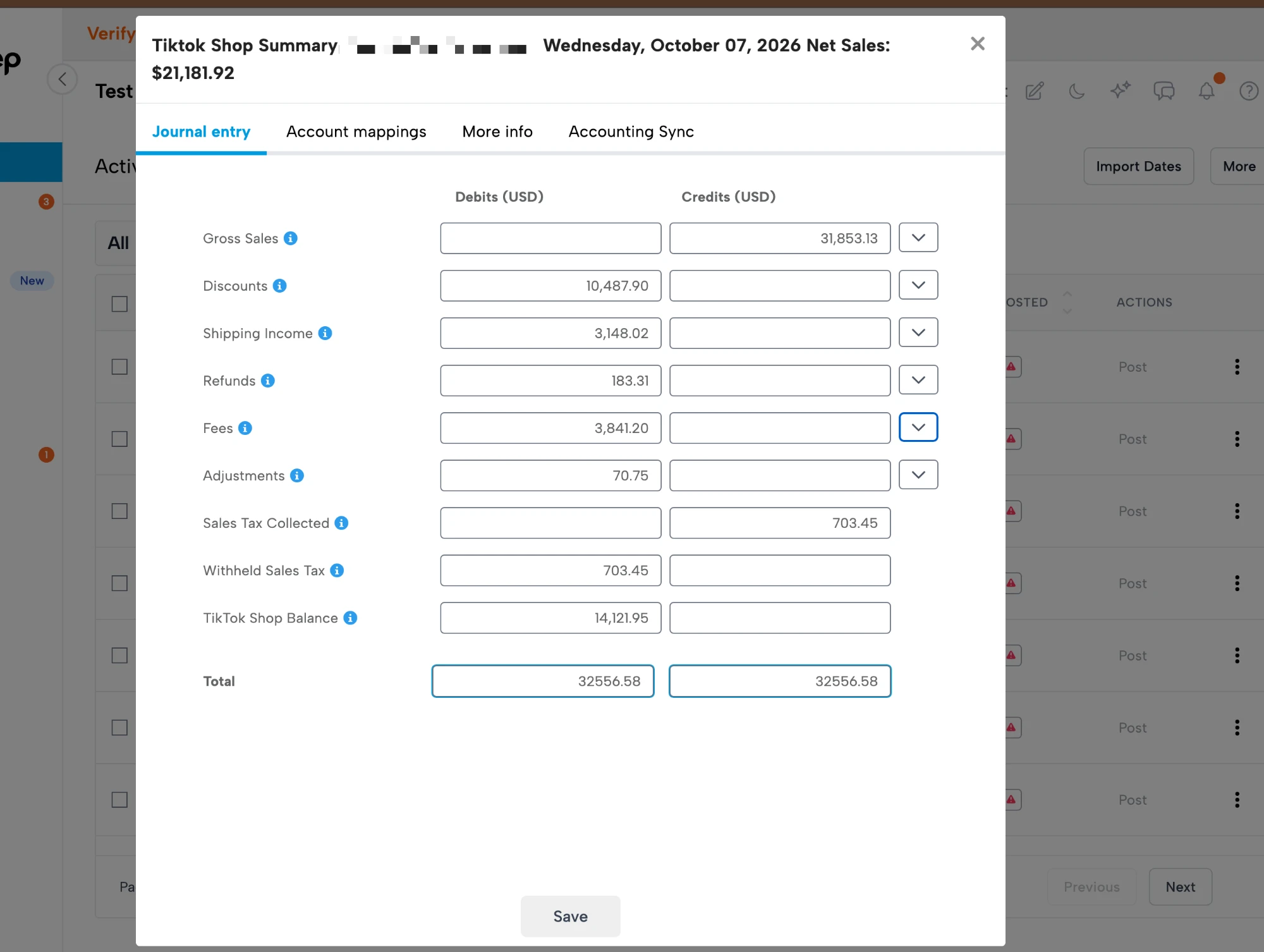
Below is an example of a TikTok Shop Summary journal entry:
Lines
| Line | Side | What it contains |
|---|---|---|
| Gross Sales | Credit | Gross sales of orders delivered that day, with a subcategory for each Product name (SKU name) |
| Discounts | Debit | Seller and platform discounts on those orders, by the same product subcategories |
| Shipping Income | Credit | Every shipping-related column of the export (customer-paid shipping, TikTok shipping fees and incentives, return shipping, fulfillment fees, subsidies and reimbursements), one subcategory per column |
| Refunds | Debit | Refunds settled that day, by product subcategory, plus a Cancellations subcategory for orders cancelled before delivery |
| Fees | Debit | Every fee column of the export (referral, transaction, affiliate commissions, campaign and ad fees, their sales tax, and so on), one subcategory per column, plus Fees on cancelled orders |
| Adjustments | Debit | Settlement lines that are not orders: logistics reimbursements, TikTok Shop reimbursements, chargebacks, warehouse fees and compensation, one subcategory per type. Positive when TikTok charged you, negative when it reimbursed you |
| Sales Tax Collected | Credit | Sales tax TikTok collected on the day's orders |
| Withheld Sales Tax | Debit | The same amount. TikTok remits the tax as marketplace facilitator, so the two lines net to zero when mapped to the same account |
| TikTok Shop Balance | Debit | The net of everything above: what TikTok owes you for the day. This clearing account is relieved by the Deposit entry |
The balance line equals the sum of the Total settlement amount column for the lines in the entry, so the clearing account always ties back to TikTok's own statements.
A line can switch sides when its net is negative. In the example above, Shipping Income is a debit because TikTok's shipping charges for the day exceeded what customers paid for shipping.
Cancelled orders
An order cancelled before delivery appears in the export with its gross sale and a refund of the same amount on one line, so it contributes nothing to Gross Sales or Refunds. Any fee or shipping charge TikTok kept on it is shown separately as Fees on cancelled orders and Shipping on cancelled orders, so you can see what cancellations cost you without inflating revenue.
Subcategories
Click the arrow next to a line to see what makes it up.
Gross Sales, Discounts and Refunds break down by product. Each subcategory is labeled Product name (SKU name) exactly as the export shows it, and the same label is used on all three lines, so a product's sales, discounts and refunds line up. A product sold many times in a day is one subcategory with the day's total.
Fees and Shipping Income break down by the export's own columns, one subcategory per column, with the fees on cancelled orders kept separate:
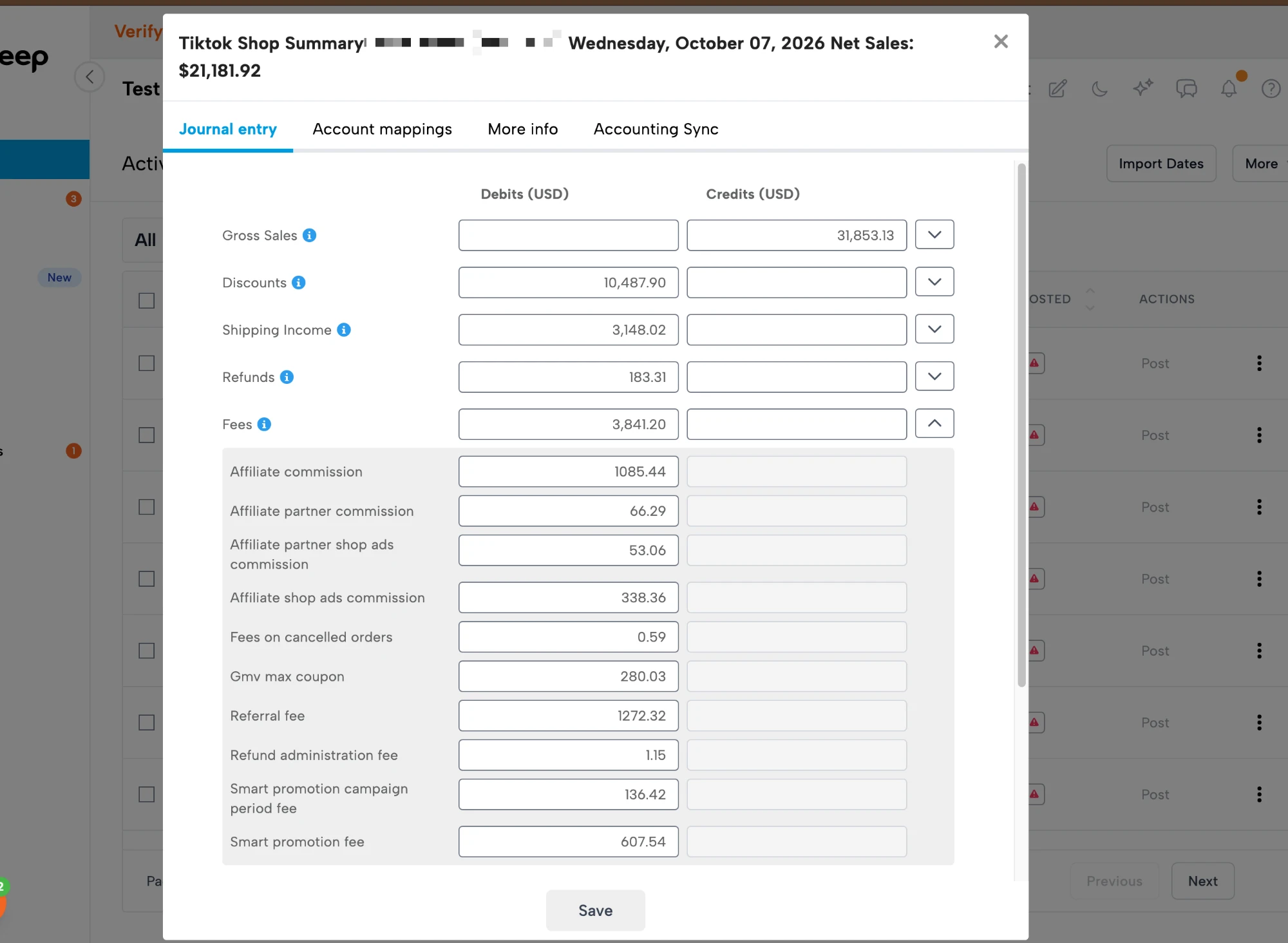
In Advanced Mapping every subcategory can be mapped to its own account: a revenue account per product line, an expense account per fee type, and so on. A subcategory you have not mapped posts to the line's main account. New products and new fee columns TikTok adds appear as new subcategories the first time they occur. If you rename a product in TikTok Shop, the new name appears as a new subcategory to map.
Source data
Each summary entry carries a CSV attachment named ORDER-LINES listing every settlement line the
day was built from, in the export's own columns, with a final column showing which part of the
summary each line went to: delivered sale, cancellation, refund or fee-only, or adjustment.
Timing
Entries are created only when you run the delivered date range from the connection's Activity view after importing a file; there is no daily scheduled run. TikTok settles the last lines of a delivery date up to two days after it and refunds trail further, so a day is only complete in an export taken three or more days later. Running a day again after a newer export has been imported updates the existing entry with any lines that settled since.
TikTok Shop Deposit
TikTok pays you in payouts, each of which settles one or more statements. The deposit entry moves the money from the clearing account to your bank, one entry per payout, dated on the day the payout completed.
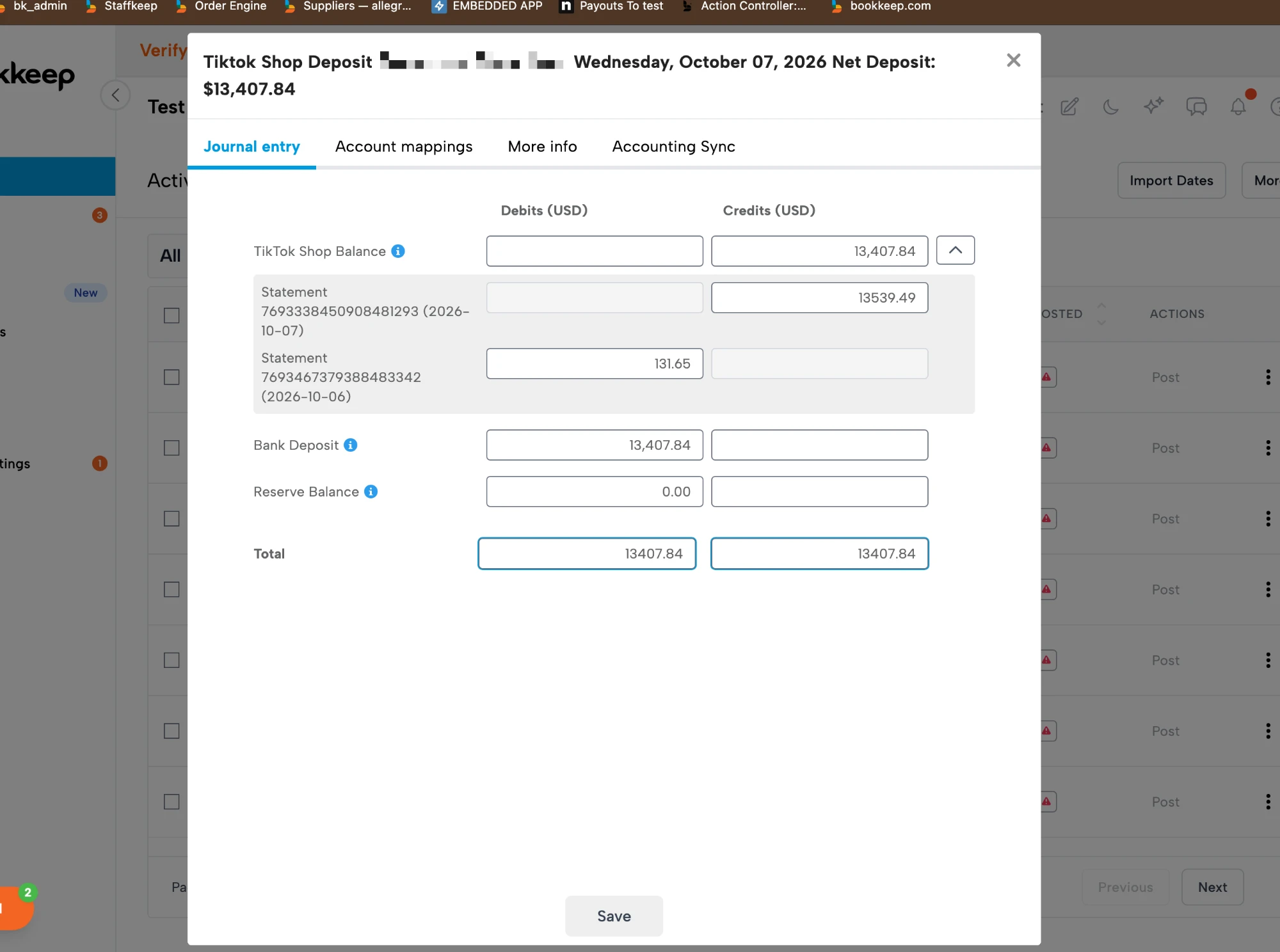
Below is an example of a TikTok Shop Deposit journal entry with the statement lines expanded:
Lines
| Line | Side | What it contains |
|---|---|---|
| Bank Deposit | Debit | The payout amount, as it will appear on your bank feed |
| TikTok Shop Balance | Credit | The settlement amount of each statement the payout covered, as one child line per statement labeled Statement <id> (<date>) |
| Reserve Balance | Debit | Any amount TikTok held back from a statement (its settlement total minus the amount payable), per statement. Negative when a previously held reserve was released |
Because every statement is listed as its own line on the entry, you can match the entry to the Statements tab of the export, and the bank deposit to your bank feed. A statement with a negative settlement (a day where refunds and fees exceeded sales, as the second statement in the example) shows as a debit, reducing the payout.
Source data
Each deposit entry carries a CSV attachment named STATEMENTS listing the payout and the
statements it settled, with their statement dates, totals, reserve and payable amounts.
When a deposit cannot be built yet
The deposit must equal the amount payable on its statements. If it does not, Bookkeep holds the entry as failed with one of two messages instead of posting a figure that will not reconcile:
- No statements in the export are linked to payout …: the payout is in the file but the statements it paid are not yet, usually because the export was taken before TikTok linked them.
- Payout … paid X but its statements are payable Y: TikTok netted a statement into the payout that your export still showed as pending.
In both cases export again a few days later, send the new file, and run that payout date again.
Reconciling
Over any period:
- the sum of the TikTok Shop Balance debits on the summaries equals the sum of the settlement amounts on the Statements tab;
- the sum of the Bank Deposit lines equals the payouts on the Payments tab, which match your bank feed;
- what remains in TikTok Shop Balance is the settled-but-unpaid amount TikTok still owes you, and Reserve Balance is what it is holding.
If you have any questions regarding the TikTok Shop journal entries, please contact support@bookkeep.com.